
Homework Timer for Kids
One homework task. A timer your child can see. An egg at the end.
How a parent can use HatchVerse for one homework task: the App Store age, what the child sees, what stays free, and the iPhone requirement.
Who it is for
HatchVerse is free on the App Store and rated 4+. Apple also files it under Made for Ages 0–5, and the store description names homework as one way families use the timer. This page is for a parent who wants that timer for a single homework task.
It runs on iPhone and iPad, iOS 17 or later. The listing is in English only.
How to start
Pick one task before the timer starts: a page of reading, a row of problems, or a spelling list. You choose the length. The public listing does not recommend a first duration, so this page does not invent one.
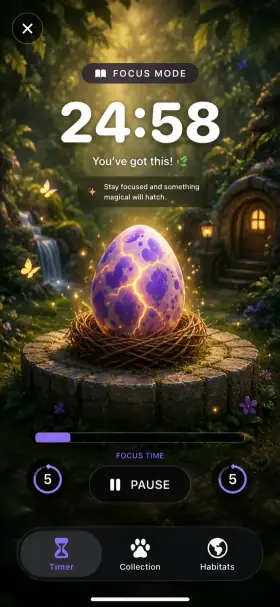
The timer screen adjusts in five-minute steps. That is what the screenshot on this page shows: a pause button between two fives, under a countdown.
What your child sees
They see the words Focus Mode, a large countdown, a short line of encouragement, and an egg in a nest. Finishing is the hatch. The animal goes into a collection that stays on the device.
There is no chat, no profile, and no account.
What stays free
Downloading is free. The terms say 12 animals are included at no charge. Habitat packs are $1.99 once, and unlocking everything is $9.99 once. There is no subscription. Purchases sit behind a parent gate.
The App Store’s version notes say more animals were added for free, and they do not name that set. This page does not guess the list.